
Table of Contents
✅ For Bundle Products, images are taken from the main (Parent) Product.
Description Settings #
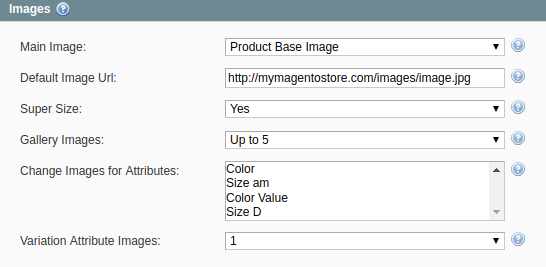
- Main Image – an image that the potential buyers will see on your eBay Item page and next to the Item title in search results.
- Default Image Url – allows specifying the absolute URL to the default Item image, e.g. http://mymagentostore.com/images/defaultimage.jpg. If the Main Image is not provided for the Item, this image will be used instead. This will help to comply with eBay requirements.
- Super Size – allows displaying larger, more detailed pictures (up to 800w x 800h pixels - 800 pixels on the longest side) if enabled. This feature may come with an additional fee.
- Gallery Images – allows adding up to 11 extra photos for each Item. The gallery images will be displayed as the small thumbnails under the Base Image on the eBay Item page.
- Change Images for Attributes – is not applied to Bundle Products.
- Variation Attribute Images – is not applied to Bundle Products.
Bundle Product Settings #
Main (Parent) Product images #
The image shows how M2E will upload Product images according to the settings above.

Images on eBay #


