
Sell on Another Marketplace is a useful feature for sellers who want to extend their business to other eBay Marketplaces. If you are selling an item on one eBay Marketplace and want to sell it on another eBay Marketplace as well, you can do it more quickly and effectively with this feature.
💡 Check out this video to see how the Sell on Another eBay Marketplace feature works.
How to start #
To start selling items on another Marketplace, make sure that you have enabled this Marketplace in M2E Pro. To do it, go to eBay > Configuration > Marketplaces.
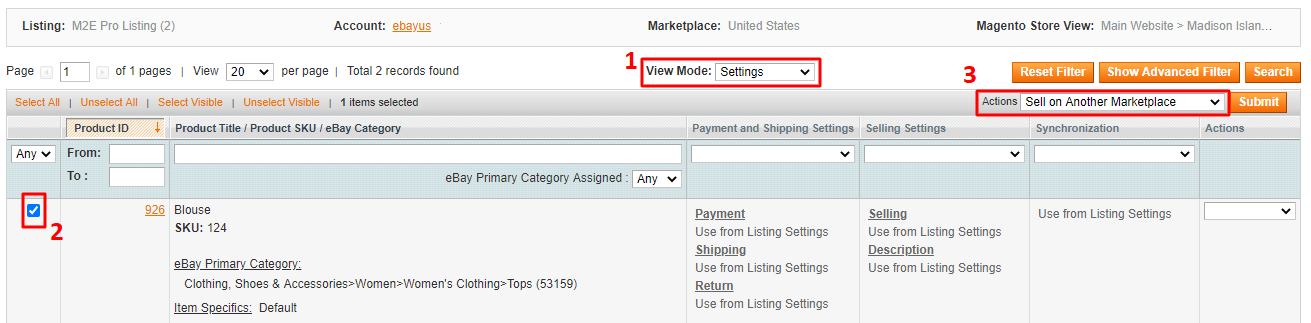
Then go to the existing M2E Pro Listing where the items are located (eBay > Listings). On top of the Listing grid, switch to Settings View Mode, select an item that you want to sell on another eBay Marketplace, and submit Sell On Another Marketplace action from the mass Actions menu.
ℹ️ Let’s take a look at the terms we are going to use further in the article:
- “From” eBay Marketplace/Account/Listing - where the items and the related data are listed now.
- “To” eBay Marketplace/Account/Listing - where the items and the related data are going to be listed.
Step 1. Main Configurations #
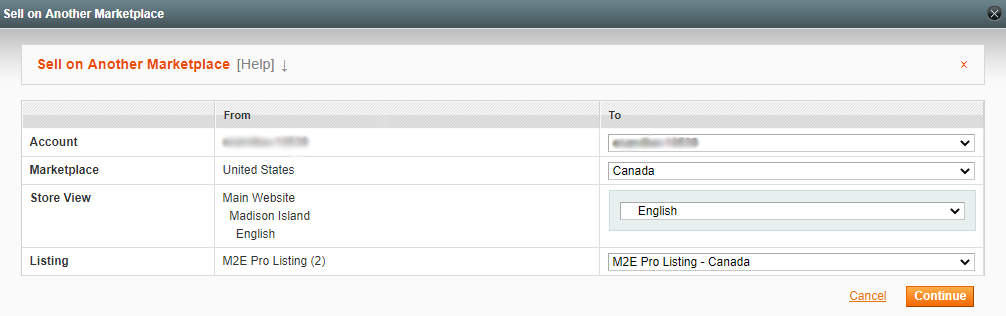
- Account. Select the eBay account where you want to list your items.
- Marketplace. Select the eBay Marketplace where you want to list your items.
⚠️ You cannot select the same “From” and “To” Marketplaces within one account. If you need to move the products to another Listing within the same eBay Marketplace, you can use the Moving feature.
- Store View. Select the Magento Store View where the Product data will be taken from.
- Listing. When eBay account, eBay Marketplace and Store View are selected, M2E Pro offers Listings with the same parameters (if they exist). You can either choose the existing Listing or create a new one.
Click Continue once you have configured all the options.
If Items with the same Magento Product ID are already present in the “To” Listing, they will not be added again and M2E Pro will notify you.

You will find all the details in Logs.
Step 2. Setting Policies #
If an existing Listing is selected, its Policies settings will be applied. You can skip the Setting Policies step and move on to step 3.
In case you select to create a new “To” Listing, you will see the Setting Policies step. There you can configure General, Payment and Shipping, Selling and Synchronization Policy Settings:

If a new Listing is created, and your “From” and “To” Marketplaces are the same:
M2E Pro will preserve all the Policies and Categories previously assigned to the Products in the “From” Listing. You can either keep these Policies and Categories or edit them later on if necessary.
If a new Listing is created, and your “From” and “To” Marketplaces are different:
M2E Pro will preserve Selling, Description, and Synchronization Policy settings previously assigned to the “From” Listing. You will have to configure new Payment, Shipping, and Return Policy settings as they vary depending on the Marketplace.
Step 3. Setting Categories #
In case “From” and “To” eBay Marketplaces differ, the next step you will see is Categories.
⚠️ In case “From” and “To” eBay Marketplaces are the same, M2E Pro will preserve the Categories previously assigned to the Products in the “From” Listing.
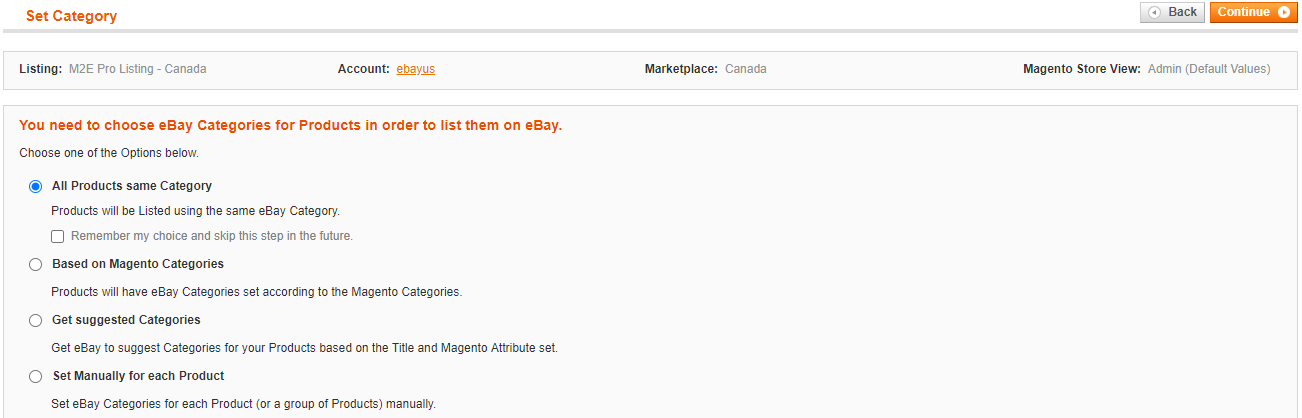
You will need to assign eBay categories and Item Specifics to the selected items. Here you can learn in more detail how to do it properly.
Step 4. Final #
The items will be added to the newly created Listing or the existing one, depending on the selected settings. You will see the following message:

Now you can manage and list the items on another eBay Marketplace directly from this Listing.


