
ℹ️ In this article, you will find out how to assign eBay categories to products when adding them to the Listing.
If you need to edit eBay categories for products that have already been added to the Listing, please see this article.
Assign categories #
It is important to assign an eBay category to an item before it’s listed on the eBay site. Products without a Primary eBay Category will not be added to the M2E Pro Listing.
⚠️ You need to assign a Channel category to at least one product when adding Magento Products to M2E Pro Listing. Until then, you cannot proceed to the following step.
To assign an eBay category, use one of the options below:
All Products Same Category #
When you choose this option, the same Category settings will be applied to all products in the M2E Pro Listing.
✅ If you select “Remember my choice and skip this step in the future”, the category you chose will be applied to all products added to this M2E Pro Listing in the future.

Based on Magento Categories #
When you choose this option, eBay categories will be set according to the Magento Categories assigned to these products.

Get Suggested Categories #
When you choose this option, you will get suggested categories from eBay. Depending on how many products you have added, this process could take a while.
Once the search is complete, a list of products will be shown along with the suggested eBay Categories. If eBay was not able to suggest a category for some products, you will get a notification and you will be able to assign the needed categories manually.

Set Manually for each Product #
When you choose this option, you will see the M2E Pro Products list. A notification will appear for a product if no eBay Category has been set.
To assign a product category, select Edit Categories from the Actions dropdown.
You can make changes to the assigned categories using the dropdown in the Actions column:
- Edit Categories allows you to set or edit eBay categories.
- Get Suggested Primary Category allows you to get eBay suggested category.
- Reset Categories will clear categories for the selected products.
- Remove Item will remove the selected product from the Product list.
✅ To manage categories in bulk, select needed products, then use the Actions menu at the very top of the grid.
Edit categories #
Once you select the Edit Categories action, you will see Category settings pop-up.
Category settings screen allows you to set Primary and Secondary eBay Categories and edit Specifics Set if needed. The Primary eBay Category is the minimum requirement.
ℹ️ You can also set the eBay Store Categories if you have an eBay Store.

To set a Category, click Edit.
You can choose from Recently Used Categories, Browse a Category list, Search by keywords or Category ID, or use a Magento Attribute that contains a valid eBay Category ID.
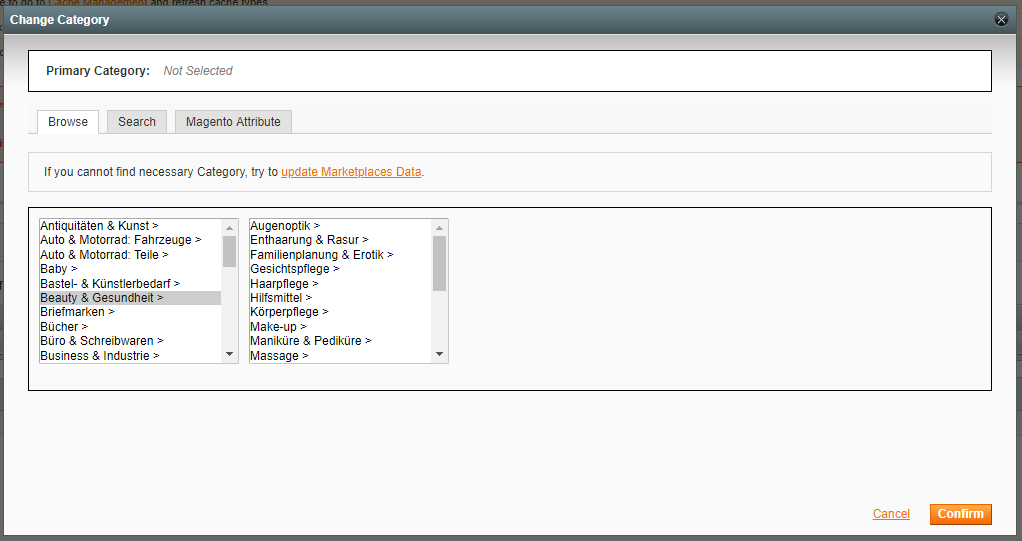
When you choose a category, click Confirm.
✅ After the Primary Category is set, you can proceed with Item Specifics.


