
You can use Magento Connect Manager to install/upgrade your M2E Pro Instance manually.
The detailed instructions on how to install/upgrade M2E Pro Module via Magento Connect package can be found below.
⚠️ This way of Extension installation/upgrade requires technical skills.
Installation #
Before you start the installation process:
- disable Compilation option in your Magento under System > Tools > Compilation if it is enabled;
- make sure you have full write permissions to all Magento files and folders;
- make your server configurations comply with the next requirements:
- Max execution time = 360 seconds or more,
- Memory limit = at least 512 MB.
Follow the next steps to install M2E Pro Module:
Step 1. Download the latest Magento Connect Package.
Step 2. Ensure that Compilation is disabled under System > Tools > Compilation.
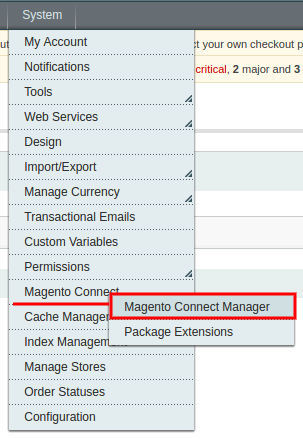
Step 3. Log into Magento Connect Manager under System > Magento Connect > Magento Connect Manager.
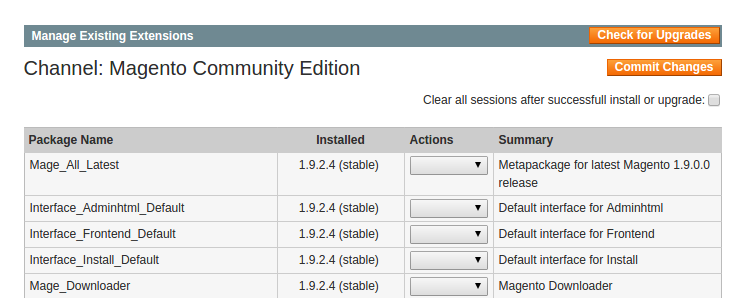
Step 4. Check Manage Existing Extensions list to ensure that M2E Pro Extension has not been previously installed.
Step 5. Upload Magento Connect Package that you've downloaded at step 1.

That's it! You have successfully installed M2E Pro on your Magento.
Provide the initial configurations for Extension and enjoy your sales on eBay/Amazon/Walmart via M2E Pro.
Upgrade #
Before you start the upgrade process:
- disable Compilation option in your Magento under System > Tools > Compilation if it is enabled;
- make sure you have full write permissions to all Magento files and folders;
- make your server configurations comply with the next requirements:
- Max execution time = 360 seconds or more,
- Memory limit = at least 512 MB.
Follow the next steps to upgrade M2E Pro Module:
Step 1. Download the latest Magento Connect Package.
Step 2. Ensure that Compilation is disabled under System > Tools > Compilation.
Step 3. Log into Magento Connect Manager under System > Magento Connect > Magento Connect Manager.
Step 4. Find M2E Pro Extension under the Manage Existing Extensions section. Uninstall the Module.

⚠️ The Uninstall action removes only the old M2E Pro version code. It does not affect your existing M2E Pro configurations. All M2E Pro Listings, Policies, etc., which you have previously created, will be preserved.
Step 5. Upload Magento Connect Package that you've downloaded at step 1.
Our Congratulations! You have successfully upgraded your M2E Pro.
✅ If you face any issues during the installation/upgrade process, read this article to find the solution.


