
M2E allows you to receive feedback and respond to it manually or automatically. The feedback list can be found by navigating to eBay > Configuration > Account > Feedback.
Seller Responses #
You can choose if you want to respond to all receiving feedback or for positive only and how you would like the system to send response messages: randomly or in a cycle.

Auto Response – allows choosing different modes of sending feedback, or disables it at all.
- Cycle Mode – the system sends response templates in a cycle.
- Random Mode – the system randomly chooses one of the response template and sends it out.
Send to – choose if you want to respond to all feedback or positive only:
- All – auto-responses will be sent to all buyers' feedback.
- Positive – auto-responses will be only sent to positive buyers' feedback.
ℹ️ The auto-response feature only works for feedback not older than 5 days.
To allow sending auto-response to your buyers, you must have at least one feedback message (response template).
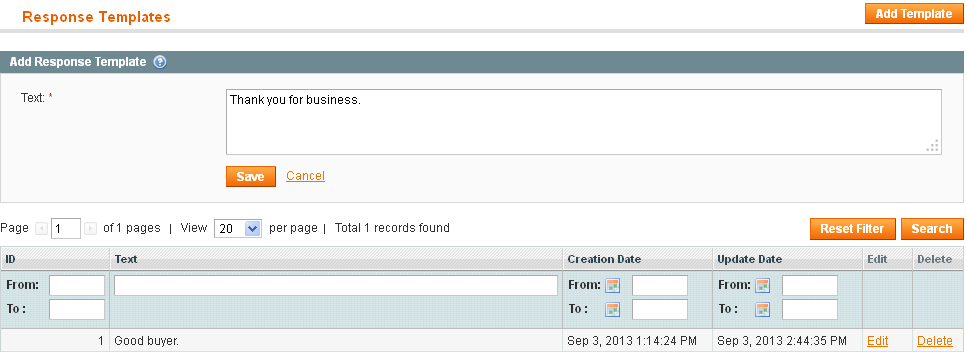
Add Response Template #
- Click Add Template.
- In the text field, enter feedback text.
- Click Save. A new template will be added to the template table.
Edit Response Template #
- Click Edit.
- Edit template text in the appeared text field.
- Click Save. Template changes will be saved.
Delete Response Template #
- Click Delete in the table line.
- Click 'Yes' in the 'Are you sure?' pop-up. The template will be deleted.
View and Manage Feedback #
To view buyers and sellers' feedback go to eBay > Configuration > Accounts Settings and click on the Feedback link.

The account feedback records will be shown in the grid.
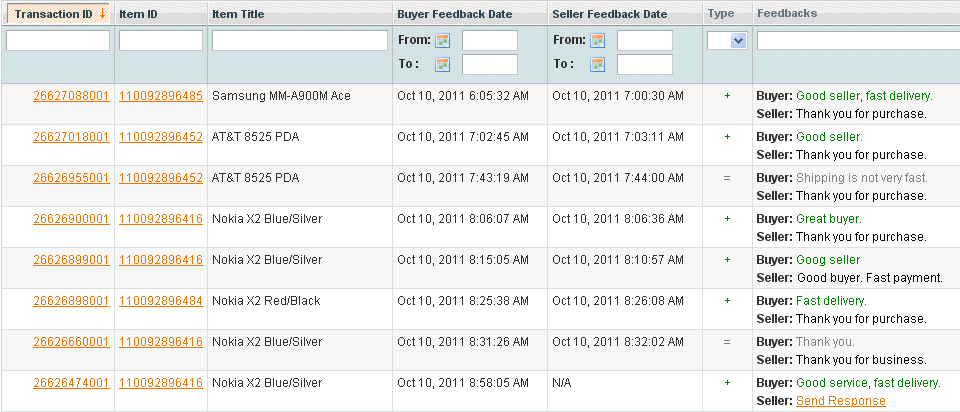
To view transaction details, click on its number.
To view a product on eBay, click on its Item ID.
Different types of Buyers' feedback are highlighted in different ways:
- Positive ( + )
- Neutral ( = )
- Negative ( – )
You can manually send a response to buyer's feedback from this grid:
1) Click the Send Response link. The Response Message section will be opened.

2) Select Predefined Feedback uploaded from Auto feedback. Templates of seller's account or enter the necessary text in the text field.

3) Click Send. The response will be immediately sent to eBay.


