
Table of Contents
✅ For Configurable Products, images are taken from the main (Parent) and associated (Child) Products.
Description Settings #
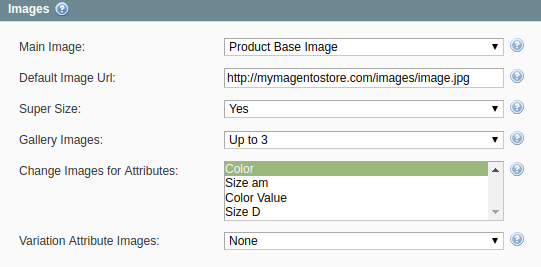
- Main Image – an image that the potential buyers will see on your eBay Item page and next to the Item title in search results.
- Default Image Url – allows specifying the absolute URL to the default Item image, e.g. http://mymagentostore.com/images/defaultimage.jpg. If the Main Image is not provided for the Item, this image will be used instead. This will help to comply with eBay requirements.
- Super Size – allows displaying larger, more detailed pictures (up to 800w x 800h pixels - 800 pixels on the longest side) if enabled. This feature may come with an additional fee.
- Gallery Images – allows adding up to 11 extra images for each Item. The gallery images will be displayed as the small thumbnails under the Base Image on the eBay Item page.
- Change Images for Attributes (applied only to Configurable Products) – allows selecting Magento attribute by which the Multi-Variational Product images will be switching on eBay.
✅ The list of available attributes depends on the Variational Attributes you use for the Configurable Products.
⚠️ Images for each Configurable Product are switching only by one variational attribute. If your Product varies by two or more attributes, M2E Pro will take into account the first attribute selected from the list.
- Variation Attribute Images (applied only to Configurable and Grouped Products) - allows adding up to 12 images for each Product variation.
✅ Find more information about image uploading here.
Configurable Product Settings #
Main (Parent) Product images #
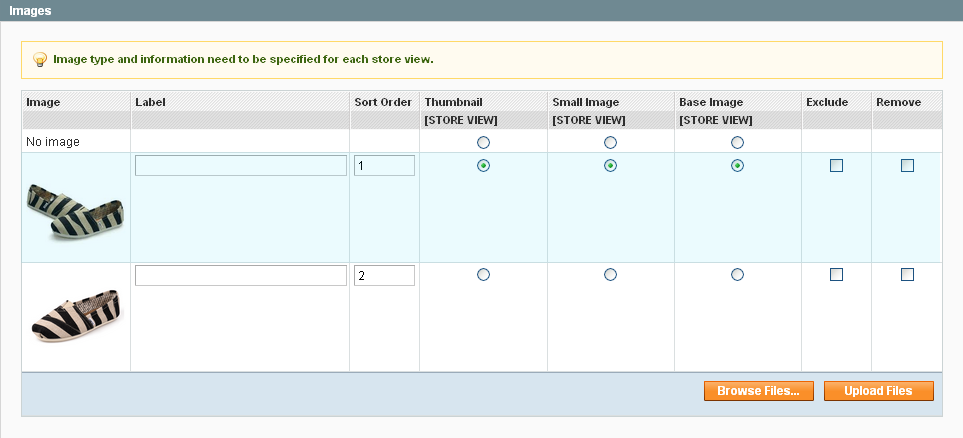
The image below shows how M2E will upload product images according to the settings above.

Associated (Child) Products #
From Associated (Child) Products images marked as Base Image will be uploaded (highlighted in blue).
Product 1

Product 2
Images on eBay #


