
M2E Pro allows you to move items from one M2E Pro Listing to another, regardless of their current status. Before you begin, make sure that the Listings and items meet certain criteria:
- You are moving an item to a Listing within the same Account and Marketplace. Otherwise, you will see a message “No records found”.
- There are no identical Magento Products in the Listing where you are moving your items to.
Follow the given instructions to move items from one M2E Pro Listing to another:
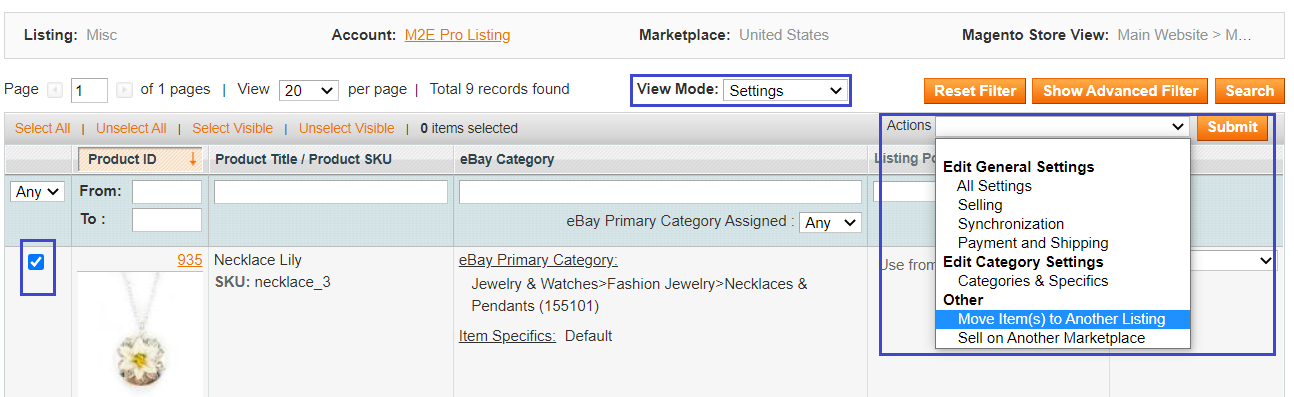
Step 1. Open your M2E Pro Listing and switch to the Settings View Mode. Select the item that you want to move and submit the Move Item(s) to Another Listing action from the mass actions menu.
⚠️ The Item cannot be moved to another Listing if some action is in process for it. Please wait until other actions get completed.
Step 2. You will see a grid with M2E Pro Listings that use the same Marketplace and Account as the current Listing. To move the items to one of the M2E Pro Listings from the grid, click on the corresponding button next to it.
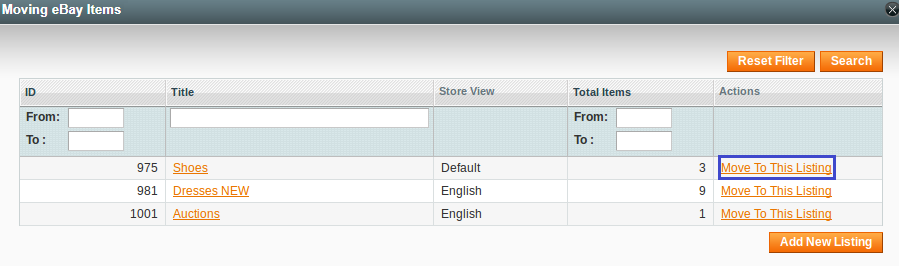
By clicking the Add New Listing button, you can create a new Listing to move items there.
✅ If you want to list the same items on different Marketplaces at once and preserve all the items’ settings, take advantage of the Sell on another Marketplace feature for eBay and Amazon.
Step 3. Confirm your choice in a pop-up that appears.
Done! The item will be moved to another M2E Pro Listing, and you will see a relevant log:

The current status of the item is not affected when the item is moved to another Listing.
⚠️ Once the items are moved, they will be updated based on the new Listing settings. The moved items with the Listed status will be revised accordingly.


