
Product Tax Code Policy allows you to apply Amazon Product Tax Codes to your items via M2E Pro. With a Product Tax Code applied, the VAT-exclusive prices will be displayed to B2B customers.
A Product Tax Code is used by Amazon’s VAT Calculation Service to determine the proper VAT rate applied to sales and refunds of your products.
Product Tax Code Policy is available for the UK, DE, FR, IT, ES marketplaces only.
⚠️ To assign a Product Tax Code Policy to your items, you have to be enrolled in Amazon’s VAT Calculation Service and enable the Use VAT Calculation Service option in M2E Pro. Find it under Amazon > Configuration > Accounts > edit Account > Invoices & Shipments > Invoice Uploading to Amazon.
To add a new Product Tax Code Policy, go to Amazon > Configuration > Policies > Add Policy:

Configuring Product Tax Code Policy #
Complete the following steps to configure Product Tax Code Policy:
- Specify the meaningful Title of your Policy.
- Choose the required Product Tax Code from the Tax Collection of your Amazon Seller Account and specify it within M2E Pro Product Tax Code Policy. Enter the value in the Tax Code field or select an appropriate Magento Attribute.
- Click Save.

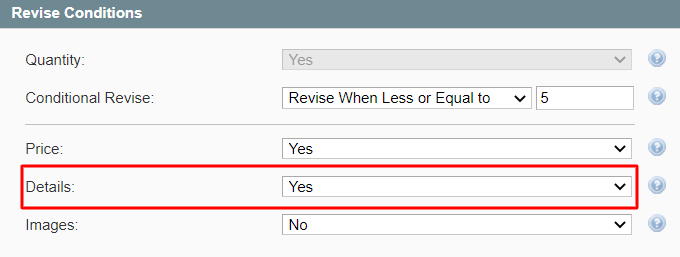
If the Details option is enabled in the Revise Conditions of M2E Pro Synchronization Policy, and the changes are made to the Magento Attribute selected in your Product Tax Code Policy, it will trigger the automatic data revise on Amazon:
✅ M2E Pro supports the integration with the Amazon Business program. If you have an approved Amazon Business Account and want to provide business-to-business sales, learn how to get them going via M2E Pro here.


