
General #
Under this tab, you can connect your M2E Pro Amazon Account to M2E Amazon Repricer, a tool that automatically and dynamically changes your product prices to make them compatible on Amazon.
To establish the connection, click Link Now.

M2E Amazon Repricer is an independent solution, so it requires a valid customer profile for further management of your Amazon accounts. That’s why you need to log in first.
Use your existing M2E Amazon Repricer credentials if you have registered earlier, or create a profile if you are a new user.

⚠️ Each M2E Pro Amazon Account should be linked separately to your M2E Amazon Repricer profile.
Once you have signed up, you will need to link your Amazon account to the service.

⚠️ If you have previously added this Amazon account/marketplace to M2E Amazon Repricer directly, the step of connecting your Amazon account will be skipped.
Then, you will be able to add the Products for repricing and specify the repricing settings.
ℹ️ See our user guide to quickly set up M2E Amazon Repricer for your needs.
Once you enable automatic repricing, M2E Pro will stop updating your products' prices to prevent double synchronization. For better visibility, repriced products will be marked with a special icon in the M2E Pro Listing grid.

⚠️ Sale Price is not compatible with price management via M2E Amazon Repricer. It will be automatically disabled within 30 minutes after the discounted product is added to Repricer.
Statistic #
Get the precise information on how many Items are currently managed by M2E Amazon Repricer:
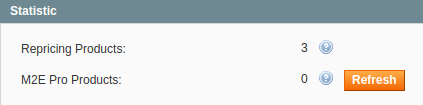
- Repricing Products - displays the total number of repriced Items related to this Amazon account.
- M2E Pro Products - displays the number of repriced M2E Pro Items related to this Amazon account.
Any changes you make via M2E Amazon Repricer take effect immediately. The full data sync between M2E Amazon Repricer and M2E Pro is run once a day. That’s why if you make updates directly in Repricer, you will get them automatically synchronized during the day or you may need to sync the data manually. Click Refresh to run repricing sync manually at a given time.
✅ You can check the synchronization logs of M2E Amazon Repricer under Amazon > Logs & Events > Synchronization.
Additional Settings #
Specify how you want to update the Regular, Min, and Max Prices, or disable the repricing feature.
Whenever the Regular, Min, or Max Price value is changed in Magento, it will be automatically updated in M2E Amazon Repricer.

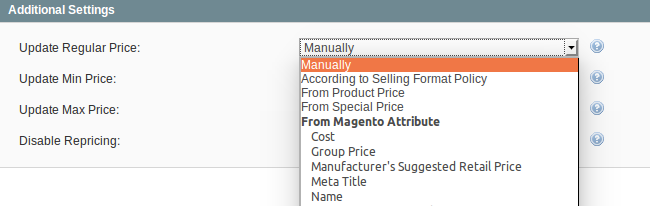
Specify the source of the Regular Price update:
- Manually - provide the Regular Price manually via M2E Amazon Repricer.
- According to Selling Policy - the value is based on the M2E Pro Selling Policy.
- From Product Price - the value is equal to the Magento Product Price attribute.
- From Special Price - the value is equal to the Magento Special Price attribute.
- From Magento Attribute - specify the value using the Magento attribute.
Select how the Min Price value should be updated:
- Manually - provide the Min Price manually via M2E Amazon Repricer
- Less than Regular Price by Value - Min Price is equal to the Regular Price decreased by the provided value.
- Less than Regular Price by Percent - Min Price is equal to the Regular Price decreased by the provided percent.
- Less than Regular Price by Value from Attribute - Min Price is equal to the Regular Price decreased by the value from the Magento attribute.
- Less than Regular Price by Percent from Attribute - Min Price is equal to the Regular Price decreased by the percent value from the Magento attribute.
- From Magento Attribute - specify the value using the appropriate Magento attribute.

ℹ️ For example, when you select the Less than Regular Price by Value option, your Min Price will be calculated as the Regular Price decreased by the value you set. If you set 5 and your Regular price is 17, the Min Price will be calculated as 12.
Select how the Max Price value should be updated:
- Manually - provide the Max Price manually via M2E Amazon Repricer.
- More than Regular Price by Value Max Price is equal to the Regular Price increased by the provided value.
- More than Regular Price by Percent - Max Price is equal to the Regular Price increased by the provided percent.
- Less than Regular Price by Value from Attribute - Min Price is equal to the Regular Price increased by the value from the Magento attribute.
- Less than Regular Price by Percent from Attribute - Min Price is equal to the Regular Price increased by the percent value from the Magento attribute.
- From Magento Attribute - specify the value using the appropriate Magento attribute.
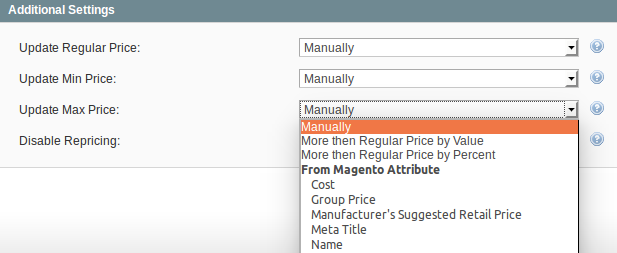
ℹ️ For example, when you select the More than Regular Price by Percent option, your Max Price will be calculated as the Regular Price increased by the percent you set. If you set 50% and your Regular Price is 10, the Max Price will be calculated as 15.
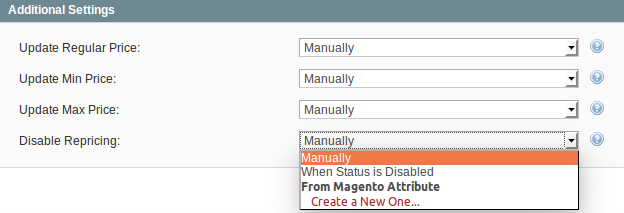
Specify a condition for disabling the dynamic repricing for your Items:
- Manually - repricing can be stopped only via M2E Amazon Repricer.
- When Status is Disabled - repricing is stopped for Magento Products with Disabled status.
- From Magento Attribute - repricing is stopped if the Yes value is specified for the selected Magento Attribute.
⚠️ When using M2E Amazon Repricer, you have to consider the following:
- It can take up to 1 hour to update the min/max/regular price with the changes made to corresponding Magento Attributes.
- M2E Pro Listing grid is updated with the repriced values once a day. That’s why you may notice a difference between price values displayed in M2E Pro and M2E Amazon Repricer. The most actual data can be found in Repricer.
- Settings provided in M2E Amazon Repricer have priority over the ones provided in M2E Pro. If your min/max/regular price is set to be updated via Magento Attributes, but then you change it directly in Repricer, your price will be recalculated based on the Repricer's value.
How to stop repricing #
If you want to stop using M2E Amazon Repricer for your M2E Pro Listings, click Unlink.

Select which action should be applied next:
- Manage the Product Prices via the Repricing Service after the Account will be unlinked - allows the M2E Amazon Repricer to control the Prices of your Offers even after the Account is unlinked.
⚠️ If you select this option, your Product Prices will be managed by both M2E Pro and M2E Amazon Repricer. This could cause the data conflict.
- Disable Repricing feature for the Products, but do not remove them from the Repricing Service - allows disabling the dynamic Price updating for Products.
- Remove the Products from the Repricing Service - allows you to physically remove the Products from M2E Amazon Repricer.


