
Using a Simple Product with Custom Options, you can create variations by adding customizable options to a product.
When listing Simple Products with Custom Options on Amazon, M2E Pro creates Variations on the basis of options.
⚠️ Magento considers a Simple Product with Custom Options as a Simple (not Multi-Variation one) above all. While it may be convenient to list certain products under this Product type, it is the least flexible for listing Multi-Variation Products on Amazon.
Let’s take a look at the example of such a Product and how its custom options are displayed in Magento:
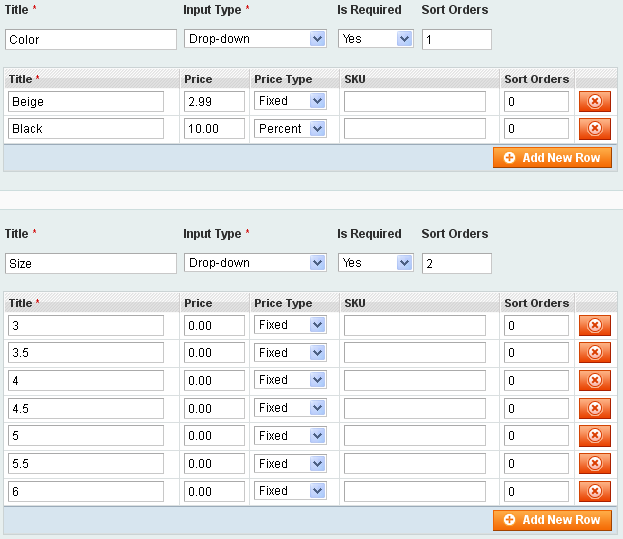
ℹ️ M2E Pro sends to the Channel only custom options marked as Required.
This Product in the M2E Pro Listing:

ℹ️ The custom options will be sent to the channel according to the order set in the Magento Product.
⚠️ It is possible to list Simple Product with Custom Options on Amazon only under the existing ASIN/ISBN. Thus, you can not assign a Product Type to it and use the Automatic Search function.
This Product on Amazon:

Find out how to calculate price and quantity for your Simple Product with Custom Options in these articles:


